
Fueling Sources, Targets, and Plans work together to define your nutrition strategy for training and racing. Once your Sources have been chosen, Targets define the hourly nutrition goals, and the Plan brings it all together — optimizing serving quantities for each Active Source to best achieve the Fueling Targets.
Create a Fueling Plan to translate your Sources and Targets into a fueling strategy.
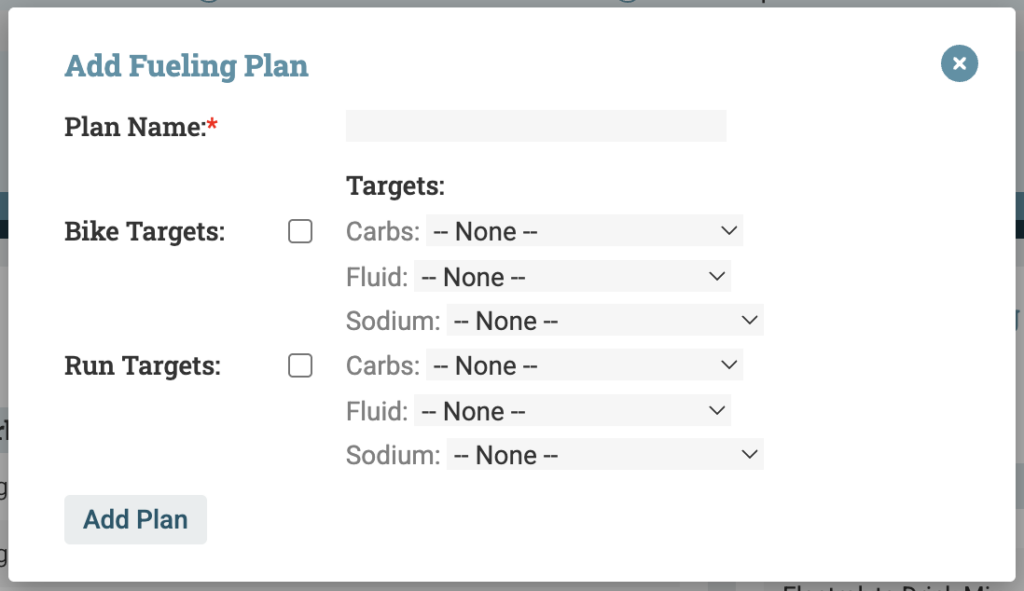
Click + Fueling Plan and give it a name — including the date, event, or context makes it easy to find later
Check the sports to include (Bike and/or Run)
For each sport, assign a Carbs Target, Fluid Target, and Sodium Target from your saved Targets
The Plan will automatically incorporate all currently Active Sources for each sport
Define Hourly Serving Quantities #
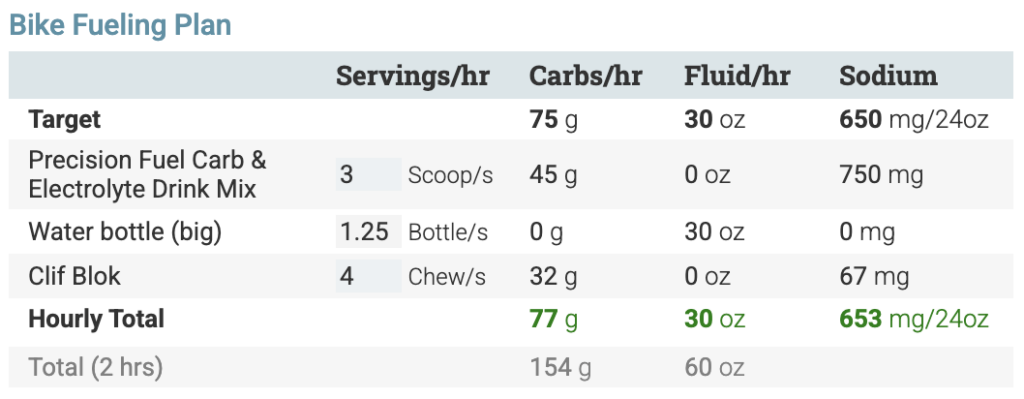
The Fueling Plan displays a table for each sport with a row for each Active Source and an input for servings per hour. Set hourly serving quantities in one of two ways:
- 1: Manually add serving values into each input field, or
- 2: Use the Calculator icon
 to open Auto-Fill, which automatically optimizes Source servings to match your Targets as closely as possible
- Choose the optimization order — for example, optimize Carbs first, then Fluid, then Sodium
- The algorithm respects each Source’s serving-size constraints (e.g., you can’t use a third of a gel) and follows your Source priority order (if the Sources aren’t listed in the correct priority order, edit the order in the Fueling Sources view and regenerate the Plan – see Review and Refine below)
- After Auto-Fill runs, you can still manually adjust any values to further optimize the Plan
Review and Refine #
As you adjust Source servings, the Plan updates in real time.
- The Target row shows your goals
- The Hourly Total row shows calculated totals for carbs, fluid, and sodium based on current servings
- Totals are color-coded to show how close you are to the Target:
- Green — within 10%
- Yellow — within 25%
- Red — more than 25% away
- The Total row shows projected total consumption for the full duration of the workout or race
- The Summary at the bottom of the Plan shows the total number of required servings for each Source to cover the full duration of the workout
If the Plan isn’t quite right, update Source priorities, swap Active Sources, or Apply and Activate new Sources to fill gaps. After changing Active Sources, click the Regenerate icon  to update the Plan to reflect the newly chosen Sources.